Email Infrastructure for Cold Outreach - March 2026
Current recommendations for cold outreach email infrastructure - covering domain setup, sending tools, warmup, and what has changed in early 2026.
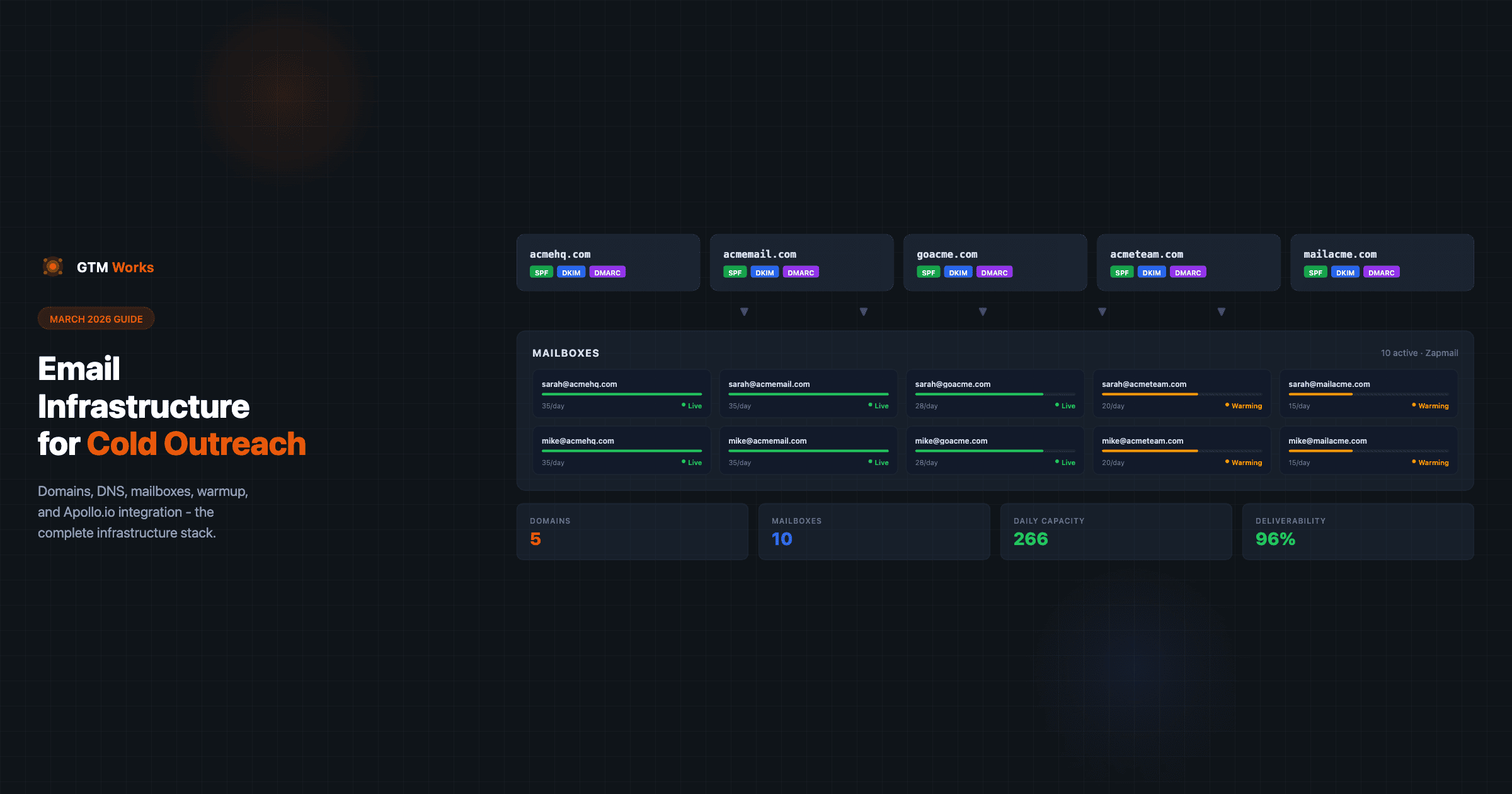
Email infrastructure for cold outreach has changed significantly in the past two years. What worked in 2022 - blasting from Google Workspace accounts on your primary domain - now gets your domain blacklisted within days. Here is where things stand as of March 2026.
What Has Changed
Google tightened bulk sender requirements in 2024, requiring stronger authentication and lower spam complaint rates for any sender exceeding 5,000 emails per day to Gmail addresses. Microsoft followed with similar enforcement actions.
The result: infrastructure that was previously optional (DMARC, dedicated sending domains, warmup) is now table stakes. Teams that have not updated their setup are seeing deliverability collapse.
Current Primary Recommendation: Zapmail
Zapmail has become our go-to recommendation for cold outreach infrastructure. It handles the full setup stack - domain purchase, mailbox creation, DNS configuration, and automated warmup - in a single managed platform.
Why Zapmail over other options:
- Managed DNS setup eliminates the most common configuration errors (missing DKIM, incorrect SPF records)
- Automated warmup is built in and runs without manual intervention
- Deliverability monitoring is baked into the dashboard
- Native Apollo.io integration for sequence sending
- Pricing is competitive for teams running 3+ mailboxes
How to get started with Zapmail:
- Create an account at Zapmail
- Purchase sending domains through the platform (or transfer existing ones)
- Configure mailboxes - Zapmail recommends 2-3 mailboxes per domain
- Let the automated warmup run for 4-6 weeks before sending cold outreach
- Connect mailboxes to Apollo.io via the Mailbox settings
Sending Domain Best Practices (March 2026)
Domain setup recommendations remain consistent with established best practices:
- Never send cold outreach from your primary domain - one spam complaint can affect all email from that domain, including transactional
- Purchase 2-4 sending domains per campaign - distributes volume and reduces concentration risk
- Configure SPF, DKIM, and DMARC on every sending domain before sending anything
- Use domain variations that are clearly associated with your brand (e.g.,
getyourcompany.com,tryyourcompany.io)
For DMARC: start at p=none to monitor reports, then move to p=quarantine once you have confirmed all legitimate sending sources are authenticated.
Alternatives to Zapmail
Instantly.ai
Instantly is the most widely used alternative. It combines sending infrastructure with its own sequencing layer. Teams that want to use Instantly for both infrastructure and outreach (instead of Apollo.io for sequencing) find the integrated workflow convenient.
Limitation: if you are using Apollo.io for sequences, Instantly adds an extra layer that can create sync issues.
Smartlead
Smartlead is popular with outbound agencies running multiple clients. The multi-account management features are strong. Similar pricing to Instantly.
Manual Google Workspace setup
Still works but requires more time per mailbox. You manage domain configuration, warmup, and deliverability monitoring separately. For teams with 10+ mailboxes, the manual overhead adds up.
Not recommended for teams scaling past 5 mailboxes.
Sending Limits in 2026
Start each mailbox at 10 emails per day once warmup is done, then raise it by 5 a week while its Apollo.io deliverability score holds at 85% or higher:
| Weekly Step | Max Emails per Day |
|---|---|
| Start | 10 |
| Week 1 | 15 |
| Week 2 | 20 |
| Week 3 | 25 |
| Week 4 | 30 |
| Week 5 | 35 |
If a mailbox’s score drops below 85%, step the limit back down 5 a week, never below 15 per day. 35 is our default ceiling, not an Apollo.io limit. The full schedule is on our Apollo.io sending limits page.
Apollo.io’s Deliverability Suite now tracks these limits per mailbox and surfaces warnings when volume approaches risky levels.
Set emails per hour to 6 once a mailbox exceeds 15/day - this ensures the daily volume can be distributed across the workday without triggering spam filters.
What to Monitor
Check weekly:
- Deliverability score per mailbox in Apollo.io (target 85%+)
- Bounce rate - keep below 3%. Spikes indicate list quality issues
- Spam complaint rate - keep below 0.1%. Spikes indicate targeting or messaging problems
- Reply rates by domain - sudden drops in a specific domain often signal deliverability degradation
If a domain’s performance degrades significantly, retire it and cycle in a new sending domain. Domains are inexpensive compared to the cost of blocked campaigns.
The Bottom Line
Cold email infrastructure in March 2026 requires:
- Dedicated sending domains (not your primary domain)
- Full authentication (SPF + DKIM + DMARC) on every domain
- A managed warmup period (4-6 weeks minimum)
- Conservative daily sending limits with gradual ramp-up
- Ongoing deliverability monitoring
Zapmail is the recommended starting point for most teams. Set it up correctly once and focus your optimization energy on targeting and messaging - not infrastructure troubleshooting.
Want us to handle it? See our Email Deliverability service for the full infrastructure build, or the Done-for-You Outbound System where deliverability is part of the larger engagement. Related: Cold email best practices for SaaS companies.