Arrow up

How to Sync LinkedIn Automation With Apollo.io in 2026

Looking  Part-time, Remote SaaS Sales reps or Resellers?
Browse the SaaS Sales Help Directory
Search by Role (BDR/SDR/AE), Industry, Geography, Experience level and more

How to Sync LinkedIn Automation With Apollo.io in 2026

If you're reading this, you're probably one of the thousands of sales teams staring at Apollo's LinkedIn task screen wondering what happened to the Execute button.

You're not imagining things. It's gone.

As of January 30, 2026, Apollo removed automated LinkedIn actions from its platform. Connection requests, messages, profile views - all of it now has to be done manually in LinkedIn, then marked complete back in Apollo.

For teams running multichannel sequences that depend on LinkedIn touchpoints, this broke everything.

Here's the good news: there's a way to get it all back. Not through Apollo directly, but by connecting a dedicated LinkedIn automation tool to Apollo via webhooks and API. Your Apollo CRM stays as the source of truth. LinkedIn outreach just runs through a different engine.

This guide walks through how it works, what you need, and how to set it up.

Related: If you're looking for automated Apollo.io reporting rather than LinkedIn integration, check out our guide on How We Built Automated Weekly Apollo.io Reports (via Email). This article covers a different topic - syncing LinkedIn automation data back into your Apollo CRM.

Why Did Apollo.io Remove LinkedIn Automation?

This wasn't a bug or a temporary outage. LinkedIn has been cracking down hard on tools that automate actions on their platform. In 2025, LinkedIn banned Apollo.io and Seamless.ai outright for Terms of Service violations related to automated data scraping and profile actions.

Apollo's response was to strip out LinkedIn automation entirely. The compliance-driven change means:

  • The Execute button is gone for LinkedIn tasks in sequences
  • Automated connection requests, messages, and profile views are no longer supported
  • You can still create LinkedIn tasks in Apollo, but you have to complete them manually in LinkedIn and mark them done

For a single rep sending 10 connection requests a day, that's annoying but manageable. For a team of 5-10 SDRs running multichannel sequences at scale, it's a dealbreaker.

Is LinkedIn Automation Against LinkedIn's Terms of Service?

Before we get into the solution, let's be upfront: LinkedIn automation is against LinkedIn's Terms of Service. That's a reality you need to be aware of before going down this path.

If you're going to do it, here's our advice based on running this for multiple clients:

  • Be conservative with volume. Don't blast 100 connection requests a day. Keep your daily limits low, especially on newer or less active LinkedIn accounts.
  • Having a Sales Navigator account helps. It's not strictly required, but it gives you more flexibility, better search targeting, and LinkedIn tends to give a bit more leeway to paying customers.
  • List quality is everything. This is the most important point. Your targeting lists need to be extremely clean. You should be reaching out to the right, most relevant people. Personalize wherever you can. Bad lists get accounts flagged faster than high volume does.
  • Warm up your accounts gradually. Don't go from zero activity to full automation overnight.

LinkedIn automation is a tool, not a strategy. Used carelessly, it gets your account restricted. Used thoughtfully with tight targeting and conservative limits, it's one of the most effective outbound channels available.

What Is the Best LinkedIn Automation Tool for Apollo.io?

We've researched and tested a lot of the LinkedIn automation tools out there - Expandi, Dripify, Phantombuster, Octopus, and others. After running campaigns across multiple client accounts, we found HeyReach to be the easiest to work with, the most reliable, and the fairest price for what you get.

A few things that set it apart:

  • Native webhook support - This is critical for the Apollo integration. HeyReach can push events (new connections, replies) to your server in real time, which most other tools can't do natively.
  • Multi-account management - If you're running outreach across multiple LinkedIn accounts or managing clients as an agency, HeyReach handles this cleanly from a single dashboard.
  • Sender rotation - It distributes actions across multiple accounts to stay within safe daily limits.
  • Reliable and actively maintained - The team ships updates regularly and the platform doesn't randomly break.

GTM Works is a HeyReach partner. We use it across all of our client engagements and can help you get set up with the right plan for your needs.

How to Connect HeyReach to Apollo.io With Webhooks

The solution is to split the workload:

  • Apollo stays as your CRM and email sequencing tool
  • HeyReach handles all LinkedIn actions - connection requests, messages, follow-ups, profile views
  • Webhooks + API sync the data between them in real time

When someone accepts a connection request on LinkedIn, that data flows back into Apollo. When someone replies to a LinkedIn message, the reply content gets written to the contact record in Apollo. Your team never has to leave Apollo to see what's happening on LinkedIn.

What Gets Synced

New connection accepted - Contact gets added to a specific list in Apollo

Reply received - Reply content is appended to a custom field on the contact record

You can also log everything to a Google Sheet for reporting and visibility.

What Do You Need to Sync LinkedIn With Apollo.io?

Here's the technical stack:

1. HeyReach account

This runs your LinkedIn automation. HeyReach supports webhooks natively, so it can push events to your server in real time. Other tools like Expandi or Dripify may work too, but HeyReach's webhook support and multi-account management make it the best fit for agencies.

2. Apollo account with API access

You'll need an API key to look up contacts and update records programmatically.

3. A small webhook server

This is a lightweight Node.js app that receives webhook events from HeyReach, looks up the contact in Apollo by LinkedIn URL, and updates the record. You don't need to be a developer to build one - more on that below. It runs in the cloud for about $5/month.

4. A custom field in Apollo

Create a text field called something like "LinkedIn Replies" on the contact record. This is where reply content gets stored.

5. An Apollo list

Create a list for new LinkedIn connections. The server automatically adds contacts to this list when a connection is accepted.

6. (Optional) Google Sheets

For logging every connection and reply to a spreadsheet your team can reference.

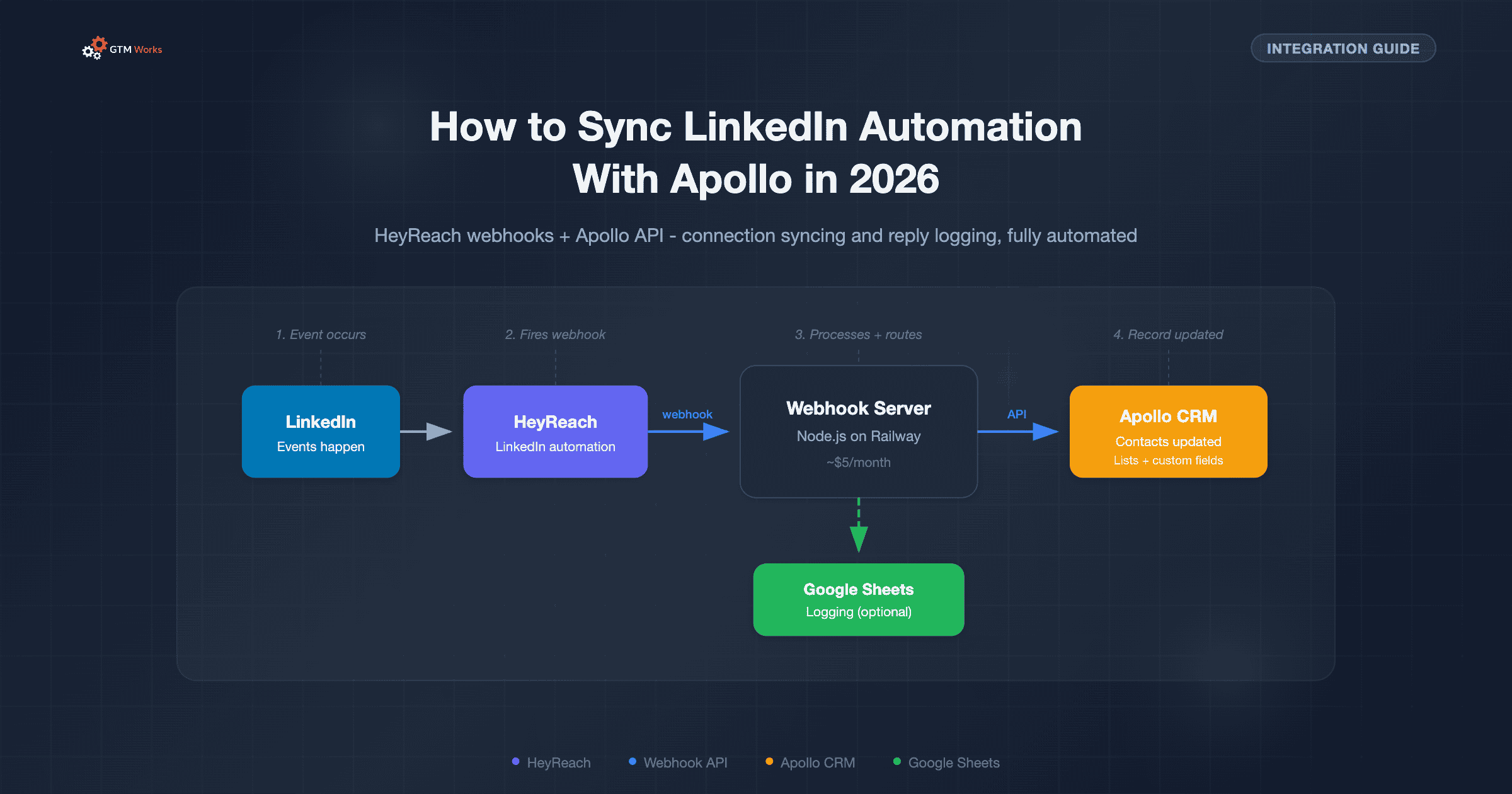
How Does the HeyReach to Apollo.io Webhook Integration Work?

Here's the flow:

  1. LinkedIn event happens (reply, connection accepted)
  2. HeyReach fires a webhook to your server
  3. Server receives the webhook with LinkedIn URL + event data
  4. Server calls Apollo API to find the contact by LinkedIn URL
  5. Server updates the contact record (custom field or list)
  6. (Optional) Server logs the event to Google Sheets

The Apollo API Calls

The server uses three key Apollo API endpoints:

  • People Match - Finds a person record by LinkedIn URL
  • Contacts Search - Finds the CRM contact record linked to that person
  • Contacts Update - Updates the contact with reply content or adds them to a list

The Webhook Payloads

HeyReach sends a POST request to your server whenever a LinkedIn event occurs. The payload includes the lead's LinkedIn URL, their name, and (for replies) the message content. Your server parses this, matches it to an Apollo contact, and updates the record.

Bonus - Automating the Apollo Side

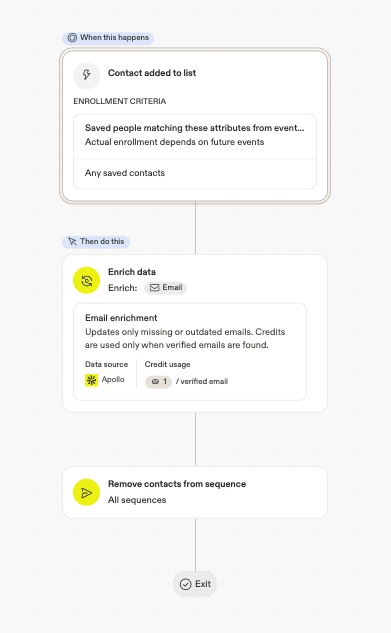
Once the webhook server is adding new LinkedIn connections to an Apollo list, you can set up a workflow inside Apollo itself to handle what happens next. Here's one we run for our clients:

This Apollo workflow triggers automatically whenever a contact is added to the LinkedIn Connections list. It does two things:

  1. Enriches the contact data - runs Apollo's email enrichment to make sure you have the most up-to-date information on the contact. This helps cut down on duplicate records and ensures you're working with verified data.
  2. Removes the contact from outbound sequences - if you're already connected with someone on LinkedIn, that's usually going to be a better channel than cold email. You don't want them getting a generic cold outreach email the same week they accepted your connection request. This step pulls them out of any active email sequences automatically.

It's a small detail, but it makes a big difference. Your outreach feels coordinated instead of spammy, and your team doesn't have to manually clean up sequences every time a LinkedIn connection comes through.

And that's just one example. Once you have LinkedIn connection data flowing into Apollo automatically, there are a lot of workflows you can build on top of it:

  • Create a call task for the rep - when a connection is accepted, automatically create a task for the assigned rep to follow up with a phone call. They're a warm lead now - someone who knows your name and accepted your request. That's a much better time to pick up the phone than a cold dial.
  • Boost contact or account scoring - if you're using Apollo's custom scoring, you can add extra weighting when a contact connects with you on LinkedIn. At the account level, this gets even more interesting - if multiple people at the same company have accepted connection requests, that's a strong signal of engagement and you can score the account accordingly.

The point is: once the data is in Apollo, you're not limited to what the webhook server does. Apollo's native workflow engine can take it from there.

How to Set Up the HeyReach and Apollo.io Integration Yourself

Here's the thing - you don't need a developer for this. The webhook server sounds technical, but with AI coding tools like Claude Code, you can build and deploy the whole thing yourself. Here's the general approach:

Step 1: Set Up HeyReach

Create your LinkedIn campaigns in HeyReach. Configure webhooks in HeyReach settings to fire on "Connection Accepted" and "Reply Received" events.

Step 2: Create the Apollo Custom Field

Go to Apollo Settings, then Custom Fields, then create a new text/textarea field called "LinkedIn Replies" on the Contact record.

Step 3: Create an Apollo List

Create a new list in Apollo called "LinkedIn Connections" (or whatever makes sense for your workflow).

Step 4: Build the Webhook Server

This is the core of the integration, and it's where people assume they need a developer. They don't. We built our webhook server using Claude Code in a single sitting. No prior Node.js experience required. You describe what you need, Claude Code writes the server, you iterate on it together, and you end up with production-ready code. The server needs to:

  • Parse the incoming webhook payload
  • Extract the LinkedIn URL
  • Call the Apollo API to find the matching contact
  • Update the contact record (append reply content or add to list)
  • (Optional) Log events to Google Sheets

Step 5: Deploy to the Cloud

We use Railway for hosting - it's simple, reliable, and costs about $5/month on their Hobby plan. You can also use Render, Fly.io, or any platform that runs Node.js. Claude Code can walk you through the deployment too. Once deployed, you'll get a public URL that HeyReach can send webhooks to.

Step 6: Connect the Webhooks

In HeyReach, set your webhook URLs to point to your deployed server endpoints.

Step 7: Test

Trigger a test event in HeyReach and verify the data shows up in Apollo and (optionally) your Google Sheet.

Can You Sync HeyReach and Apollo.io Without Code Using Make or Zapier?

If you'd rather not write code, you can build this integration using a workflow automation platform like Make or Zapier. The logic is the same - receive a webhook from HeyReach, look up the contact in Apollo, and update the record - but instead of a custom server, you wire it together visually.

We've used Make for this in the past. It works, but in our experience it's been less reliable than a dedicated webhook server. Workflows occasionally stall, webhook triggers can be inconsistent, and debugging failed runs in a visual editor is slower than reading server logs. For a team that needs this running reliably at scale, the custom server approach is worth the extra effort.

That said, if you want to get something working quickly or you're already comfortable with Make or Zapier, here's what you'd need to set up:

  • Create a webhook trigger node to receive POST requests from HeyReach
  • Parse the incoming payload to extract the LinkedIn URL and event type
  • Add an HTTP request node to call Apollo's People Match API with the LinkedIn URL
  • Add another HTTP request node to search Apollo Contacts using the matched person ID
  • Add a conditional/router node to handle replies vs. new connections differently
  • For replies: update the contact's custom field with the reply content via Apollo's Update Contact API
  • For connections: add the contact to your designated Apollo list via the Update Contact API
  • (Optional) Add a Google Sheets node to log each event to a spreadsheet
  • Deploy and set your Make/Zapier webhook URL in HeyReach's webhook settings

What Are the Common Issues With Apollo.io LinkedIn Webhook Integrations?

This isn't plug-and-play. Here are the gotchas that trip people up:

LinkedIn URL matching is fragile. LinkedIn URLs come in many formats - http vs https, www vs no www, trailing slashes, country-specific domains. Your server needs to normalize these before matching.

Apollo's People Match endpoint can create records. If you're not careful, looking up a LinkedIn URL in Apollo can actually create a new person record, leading to duplicates. The lookup logic needs to be precise.

Custom fields use internal IDs, not names. You can't just say "update the LinkedIn Replies field." You need to find the internal field ID via the API and use typed_custom_fields in your update calls.

Multi-client setups require routing logic. If you're an agency managing multiple client accounts, each client has their own Apollo and HeyReach credentials. Your server needs to route webhooks to the right client configuration.

HeyReach webhook payloads vary. The field names in the webhook payload may differ depending on the event type and HeyReach version. You need defensive parsing that checks multiple possible field names.

Should You Build This Integration Yourself or Hire an Expert?

A year ago, this would have been a "hire a developer" situation. Not anymore. With AI coding tools like Claude Code, a non-technical ops person can build this in an afternoon. You describe the logic in plain English, Claude Code writes the server, you test it, and deploy. We've done it ourselves, and we've watched clients do it too.

That said, there are still reasons to bring in help:

  • Edge cases add up. LinkedIn URL normalization, Apollo's custom field IDs, defensive webhook parsing - Claude Code handles these well, but you need to know what to ask for
  • Multi-client setups get complex. If you're an agency managing multiple client accounts, each with their own Apollo and HeyReach credentials, the routing logic and configuration management is a bigger lift
  • Ongoing maintenance is real. APIs change, webhooks break, and someone needs to be watching the logs. Building it is one thing - keeping it running is another

For a single team with one Apollo account, you can absolutely do this yourself with Claude Code in a day. For anything more complex, or if you just don't want to deal with the maintenance, that's where we come in.

How GTM Works Manages LinkedIn Outreach and Apollo.io Integration

At GTM Works, we don't just set up the integration - we run the whole thing. Our LinkedIn Managed Outreach service includes:

  • Full HeyReach + Apollo webhook integration - connection syncing, reply logging, everything flowing back to your Apollo CRM automatically
  • Campaign strategy and list building - we help you target the right people with the right messaging
  • Google Sheets reporting - every LinkedIn interaction logged and visible to your team
  • Multi-account management - if you're an agency, we set up isolated configurations per client
  • Ongoing maintenance and optimization - API changes, webhook updates, campaign tuning, troubleshooting - we handle it so your team can focus on selling

The technical integration runs on a lightweight cloud server that costs a few dollars a month. We get it up and running in days, not weeks.

If your team is stuck doing LinkedIn tasks manually because Apollo pulled the plug, let's fix that.

Ready to Get Started?

Tell Us About Your Outbound Sales Needs

Services you are interested in:
Thank you! Your submission has been received!
Oops! Something went wrong while submitting the form.
Interested in flexible SaaS Sales roles?

Get Listed in the SaaSBoost.io
SaaS Sales Database - Create a Profile

Tell us about your SaaS Sales background and ideal role. We will connect you with interested SaaS companies looking for flexible/part-time SaaS sales help.
SaaS Experience - select all categories that apply:
Geography you are located in:
Languages your are fluent in - select all that apply:
Years Experience:
Outsourced Services Provided - select all categories that apply:
Compensation Requirements:
Thank you! Your submission has been received!
Oops! Something went wrong while submitting the form.
Apollo.io has great reporting, but no way to get it emailed to you. We built automated weekly email reports using the Apollo.io API — here's what's included and how to set it up yourself.

Need Help Syncing LinkedIn With Apollo?

We'll set up the full HeyReach + Apollo webhook integration, run your LinkedIn campaigns, and keep everything flowing back to your CRM automatically. No dev work on your end.

Get Started

Apollo Strategy and Setup

Get Expert Advice and Guidance in Setting Up an Automated Cold Outreach Lead Engine Powered by Apollo
Apollo.io

How We Built Automated Weekly Apollo.io Reports (via Email)

Apollo.io has great reporting, but no way to get it emailed to you. We built automated weekly email reports using the Apollo.io API — here's what's included and how to set it up yourself.
Apollo.io

Apollo.io AI Research for Personalized Outreach and Account Prioritization

Learn how to use Apollo’s AI Research to prioritize accounts at scale and personalize outreach without stitching together Clay, Zapier, or extra tools. We build a targeted list with lookalikes, craft a web-enabled prompt, create a Product Signal Score custom field, and turn that into a clean sentence you can drop into Apollo sequences.
Sales

The Ultimate Directory of B2B Data Sources for Outbound Sales

This is a curated list from testing tools over the years and talking to hundreds of B2B marketers, SDRs, and go-to-market pros. Whether you're building your first outbound motion or optimizing a mature engine, this reference will help you find the right tool for the job.

Best SaaS Contracts Lawyers 2025 - Complete Guide

Top 19 SaaS Contracts Attorneys and Platforms Compared

One of the first tasks for an early stage SaaS company is getting a legal structure and documents in order. This includes Terms of Service, a Privacy Policy, and various agreements and contracts. SaaS and Internet law can have its own nuances so it is recommended you hire and work with a SaaS focused attorney.

The guide includes a range of pricing options from straightforward, project based contract work with an individual SaaS focused lawyer to firms focused on scaling fast growing startups and catering to all of their legal needs.

Read the Guide
Newsletter
Looking to grow your SaaS revenue? Sign up for news, tips, calculators and other B2B SaaS sales and marketing resources.
Thank you! Your submission has been received!
Oops! Something went wrong while submitting the form.
By signing up you agree to our Terms & Conditions