How We Built Automated Weekly Apollo.io Reports (via Email)
A breakdown of how GTM Works built an automated weekly reporting system using the Apollo.io API and Node.js to send email performance reports to clients.
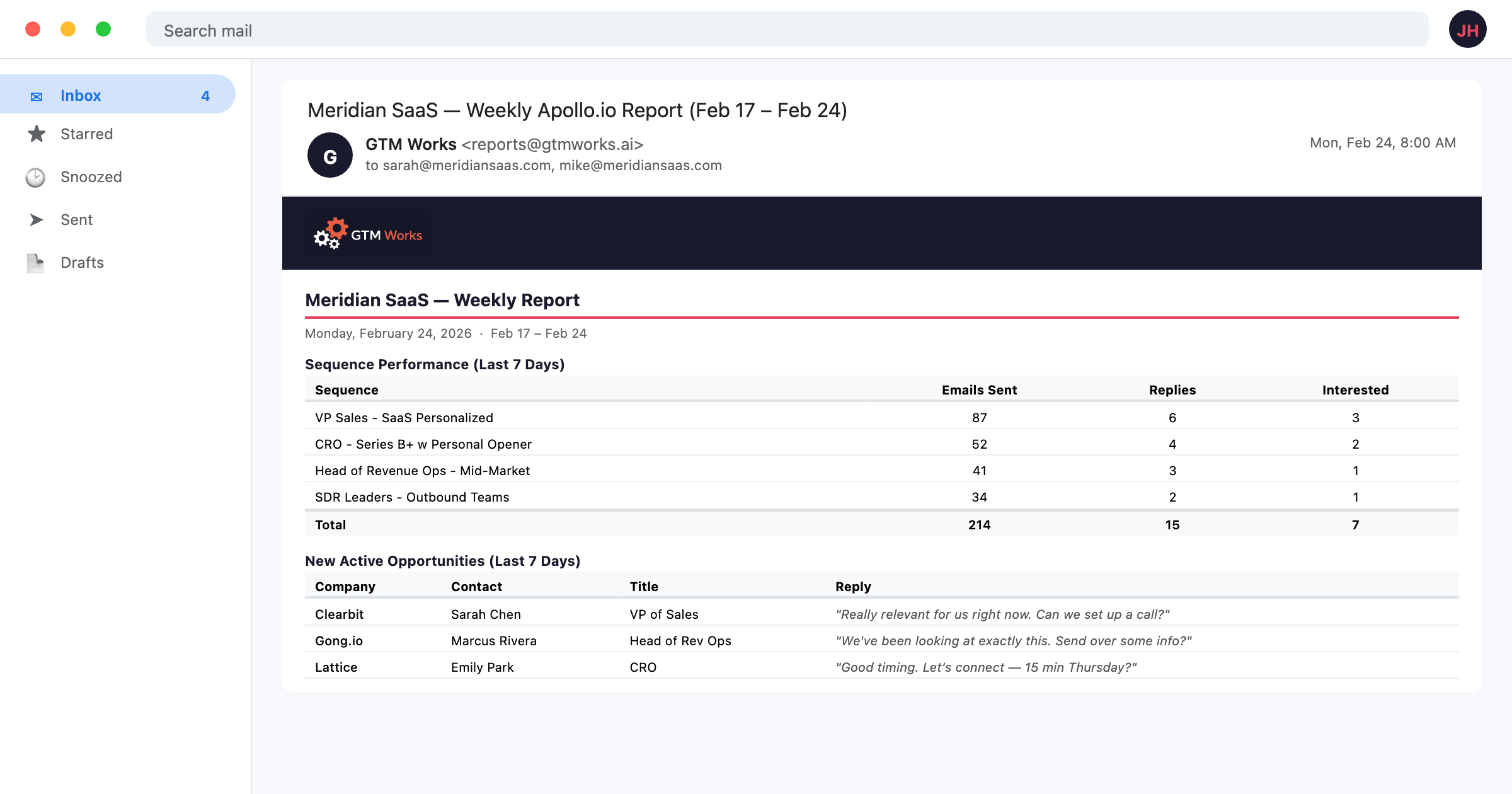
Apollo.io has a reporting section built in, but it requires logging into the platform to see metrics. For clients who want a weekly summary in their inbox without navigating the Apollo.io interface, we built an automated email reporting system using the Apollo.io API and Node.js.
Here is how it works.
The Problem We Were Solving
Our clients wanted weekly performance updates on their outbound sequences - open rates, reply rates, interested rates, and number of new contacts added. They did not want to log into Apollo.io every week to pull these numbers themselves, and we did not want to pull them manually either.
The Apollo.io API makes this automatable.
The Tech Stack
- Apollo.io API - pulls sequence and contact data
- Node.js - runs the data fetching and report generation logic
- Nodemailer - sends the formatted report via email
- Railway - hosts the scheduled job
The script runs on a cron schedule every Monday morning and delivers an email report to the client.
What the Reports Include
Each weekly report covers:
Sequence Performance
- Total emails sent (last 7 days)
- Open rate
- Reply rate
- Interested rate (contacts who replied positively)
- Bounce rate
- Per-sequence breakdown when multiple sequences are active
Contact Activity
- New contacts added to sequences
- Contacts completed (finished the sequence without replying)
- Contacts marked as interested or demo booked
Mailbox Health
- Deliverability scores per mailbox
- Mailboxes flagged for review (score below 85%)
- Daily send limits vs. actual sends
Apollo.io API Endpoints Used
The core data pulls use three API endpoints:
GET /api/v1/emailer_campaigns - retrieves all active sequences and their aggregate stats
GET /api/v1/emailer_stats/daily - pulls daily stats by sequence for the date range
GET /api/v1/email_accounts - retrieves mailbox data including deliverability scores and daily limits
All endpoints use API key authentication. Client API keys are stored in per-client environment files outside the repo, loaded at runtime.
Report Format
The report is sent as an HTML email with a clean table layout. Each section has:
- A bold header
- A simple table with metrics and values
- Color-coded indicators (green for good, yellow for watch, red for action needed)
We keep the format simple - the goal is a quick summary that a client can scan in 60 seconds, not a comprehensive analytics dump.
Client-Specific Configuration
Each client has a configuration file that specifies:
- Which sequences to include (by sequence name or ID)
- Which mailboxes to monitor
- Who receives the report
- Any client-specific notes or thresholds (e.g., a client who wants alerts when interested rate drops below 0.5%)
This makes the system easy to extend as we add new clients or change reporting scope.
Additional Report Types
Beyond the weekly summary, we have built variations for specific use cases:
- Mailbox ramp-up report - sent after each mailbox limit increase, confirming current limits across all mailboxes
- Monthly comparison report - month-over-month stats for tracking campaign performance over time
- Alert report - triggered when a deliverability score drops below threshold, sent immediately rather than waiting for the weekly cycle
Running It Yourself
The script is structured to run with a single command per client:
node scripts/weekly-report.js --client clientnameOr for all clients:
node scripts/weekly-report.js --allThe --dry-run flag generates the report HTML and saves it to disk for review without sending the email - useful for checking formatting before scheduling.
What We Learned Building This
A few things that made this more useful than expected:
- Clients who never logged into Apollo.io started noticing trends and asking better questions about their campaigns once they had a weekly number to reference
- The mailbox health section caught deliverability drops we might have missed otherwise - the automated monitoring is more consistent than manual checks
- Keeping the report format simple was the right call. Early versions had more metrics. Clients engaged more with the shorter version.
If you run an Apollo.io-based outbound program for multiple clients (or even just for your own team), automating the weekly report is worth the one-time setup. The Apollo.io API is well-documented and the data is reliable.